Kimi Code CLI on Smart Pi One
Kimi Code CLI is Moonshot AI's Kimi Code — the TypeScript successor to the Python Kimi CLI — packaged by YUMI-LAB to run natively on the 32-bit ARM (Allwinner H3 / armv7l) Smart Pi One and Smart Pad, a platform the official installer ships no build for.
Repository: github.com/Yumi-Lab/kimi-code-smartpi
Kimi CLI vs Kimi Code CLI
Two Moonshot tools, both installable side by side. Kimi CLI (kimi, Python) is the lighter option on a 1 GB board. Kimi Code CLI (kimi-code, TypeScript) is where the upstream feature work happens (local web UI, ACP, plugins, agents) — but it carries a heavier Node warm-start. See Coexistence.
1. How it works
Kimi Code runs natively on the board, always on the latest version. One command installs it — including the Node runtime it needs — and the same command updates it. You sign in with your Kimi account, or use an API key. It installs alongside the Python Kimi CLI without touching it.
2. Requirements
armv7l/ 32-bit ARM SBC with at least 1 GB RAM- A Debian-based Linux distribution (tested on the Smart Pad — trixie armhf)
- Node 22 — the installer adds it for armv7l if needed
~/.local/binon your$PATH- A Kimi account (OAuth sign-in) or an API key (Kimi Code plan / Moonshot platform)
3. Installation
Run the one-line installer on your Smart Pi One as a normal user (not root):
The installer always fetches the newest version published on npm (re-running it is the update path). To pin or roll back:
~/.local/bin is added to ~/.bashrc and ~/.profile — open a new shell or run . ~/.profile.
4. Authentication
Sign in with a Kimi account (recommended)
The device-code flow is headless — nothing to open on the pad:
kimi-code login
# → open the printed URL in any browser signed in to your Kimi account, then approve.
Credentials and config land in ~/.kimi-code/. Coming from the Python CLI? kimi-code migrate imports the legacy ~/.kimi/ data.
API key (non-interactive — for the gateway)
For a fully headless / service setup, configure a provider in ~/.kimi-code/config.toml (no login step). A Kimi Code plan key (sk-kimi-…) pairs with the Kimi coding endpoint (model kimi-for-coding):
default_model = "kimi-for-coding"

[providers."managed:kimi-code"]
type    = "kimi"
baseUrl = "https://api.kimi.com/coding/v1"
apiKey  = "sk-kimi-…"                 # or leave "" and export KIMI_API_KEY

[models.kimi-for-coding]
provider         = "managed:kimi-code"
model            = "kimi-for-coding"
max_context_size = 262144            # required by the schema
chmod 600 ~/.kimi-code/config.toml, then kimi-code doctor should print OK config.toml. A Moonshot platform key (sk-… from platform.moonshot.ai) works the same way with baseUrl = "https://api.moonshot.ai/v1" and a Moonshot model id.
5. Usage
| Command | Purpose |
|---|---|
kimi-code |
Full interactive agent — the official TUI, running natively |
kimi-code -p "your question" |
One-shot, non-interactive (--output-format text\|stream-json) |
kimi-code web |
Local web UI (Vue) — reachable from the LAN |
kimi-code acp |
Agent Client Protocol server over stdio (Zed, JetBrains…) |
kimi-code doctor |
Validate the configuration |
kimi-code migrate |
Import data from a legacy kimi-cli install |
KIMI_CPUS=0,1 kimi-code … |
Limit the running agent to 2 cores (default: all 4) |
KIMI_DAEMON=1 kimi-code -p … |
Queue headless jobs, 2 live at a time (see below) |
kimi-code-check-update |
OTA probe — one JSON line |
kimi-code-daemon-status |
Daemon probe — one JSON line |
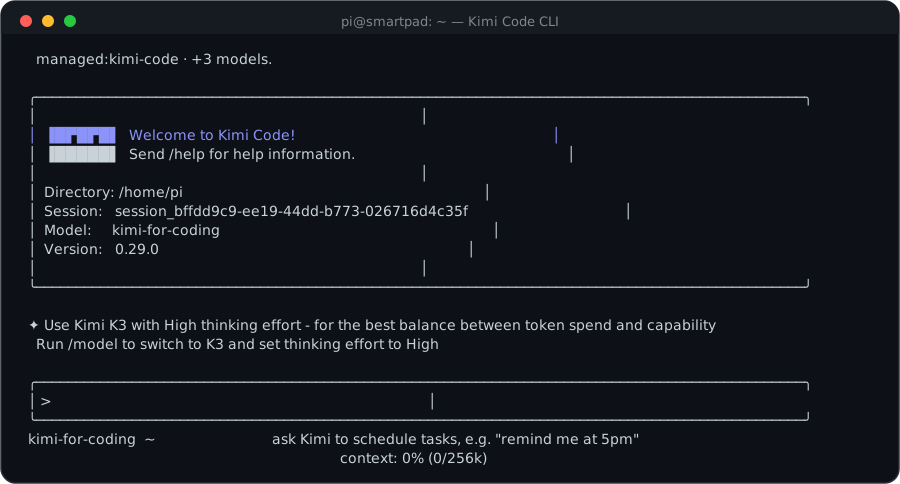 Live interface captured on a Yumi board (armv7l, Yumi OS 26.05).
Cores, warm start, daemon
- Cores.
KIMI_CPUSpins the running agent (taskset+nice -n 5) — the runtime twin ofGROK_CPUSandCLAUDE_CPUS. Default: all 4 cores.KIMI_CODE_CPUSoverridesKIMI_CPUSwhen you want the two Kimi CLIs throttled differently. - Warm start. The launcher sets
NODE_COMPILE_CACHE, so Node 22 caches the V8 bytecode of the 16 MB bundle: the compile happens once (the installer primes it), later launches skip it. A Node upgrade invalidates the cache automatically. - Daemon (batch work).
KIMI_DAEMON=1routes headless runs (-p, or piped stdin) through a small job daemon — a FIFO queue with a semaphore ofKIMI_MAX_CONCURRENT(default 2) live runtimes. A queued job costs ~0 RAM until a slot frees, which lets a 1 GB board accept a batch without swapping. It lazy-starts and exits afterKIMI_IDLE_MS(default 5 min) idle. The interactive TUI never goes through it.
KIMI_DAEMON=1 kimi-code -p "summarise this repo"   # queued if 2 are already running
kimi-code-daemon-status --json     # {"daemon":true,"running":2,"max":2,"queued":3}
6. Updating (OTA)
- Update: re-run
install.sh— that is the updater. It resolves the newest npm version, is a no-op when you are already current, and reinstalls the launcher/shims/probes. - Check:
kimi-code-check-updateprints one JSON line ({installed, latest, update_available}). - Never run
kimi-code upgrade(upstream's self-updater) — it downloads a binary release, and there is none for 32-bit ARM. - Everything lives under
$HOME— no sudo after the first install.
7. Coexistence with the Python Kimi CLI
Both can live on the same pad, side by side:
| Command | Config | Install path | |
|---|---|---|---|
| Kimi CLI (Python) | kimi |
~/.kimi/ |
uv tool |
| Kimi Code CLI (TypeScript) | kimi-code |
~/.kimi-code/ |
npm, ~/.local/lib/kimi-code/ |
The Python CLI stays the lighter, faster-to-start option on a 1 GB board; kimi-code is where the new features land, at the cost of a heavier warm start.
8. Notes
- Performance: the first install downloads a large bundle and takes a few minutes; interactive launches then pay a one-time warm start per session (parsing the JS bundle on a slow ARM core), invisible in an interactive run and amortised by the daemon, but heavy for a loop of fresh one-shot
-pcalls — prefer one session, or the daemon. Each live runtime uses a few hundred MB. - Node ceiling: the port runs on the Node 22 line (there is no Node 24 build for armv7l), so it lives as long as kimi-code supports Node 22.
earlyoomis installed as a memory safety net. Rule of thumb: run one heavy CLI at a time.- Licensing: the installer scripts are MIT (YUMI-LAB); Kimi Code itself is installed from the official npm package (
@moonshot-ai/kimi-code) at runtime — not redistributed here — and remains subject to Moonshot AI's terms.