Grok CLI on Smart Pi One
Grok CLI is xAI's official Grok command-line assistant, packaged by YUMI-LAB to run on the 32-bit ARM (Allwinner H3 / armv7l) Smart Pi One and Smart Pad — hardware the standard installer rejects as unsupported.
Repository: github.com/Yumi-Lab/grok-cli-smartpi
1. How it works
xAI ships Grok only as a 64-bit binary, so on the Smart Pi One it runs through QEMU emulation — the installer sets all of that up for you, and you get the official Grok interface, unmodified.
The installer always fetches the latest published Grok and doubles as the updater — re-run it to update. A warm daemon keeps a process ready so repeat grok -p calls answer quickly, and GROK_CPUS limits how many cores it uses.
2. Requirements
armv7l/ 32-bit ARM CPU (Allwinner H3)- At least 1 GB RAM
- A Debian-based Linux distribution (tested on the Smart Pad — Debian 13 trixie armhf)
- An X (x.com) or grok.com / SuperGrok account — a standard X subscription works; no API key needed
- root/sudo for the first install only (installs into
/opt/grok); updates then run unprivileged
3. Installation
Re-run it any time to move to the latest. To pin a version: GROK_VERSION=<version> …. The installer also enables earlyoom for memory safety on the 1 GB board.
4. Authentication
Grok CLI signs in with your X (x.com) / grok.com account through a device-flow authorization — a standard X subscription works, no API key required, and no browser needed on the board itself.
The CLI displays an accounts.x.ai URL and a verification code. Open the URL on any machine, enter the code to approve access, and the CLI detects the authorization automatically.
5. Usage
| Command | Purpose |
|---|---|
grok |
The official Grok interactive interface |
grok -p "your question" |
One-shot answer through the warm daemon — fast once warm (GROK_DAEMON=0 for the old direct behaviour) |
grok-daemon status\|stop |
Inspect / stop the warm agent daemon (stops itself when idle) |
grok-live -p "your task" |
One-shot with readable streaming (dimmed reasoning) |
grok-chat |
Minimal multi-turn REPL |
grok models |
Show the signed-in account and model |
grok-check-update |
OTA probe — one JSON line |
GROK_CPUS=0,1 grok … |
Run on a CPU subset for this launch (default = all 4 cores) |
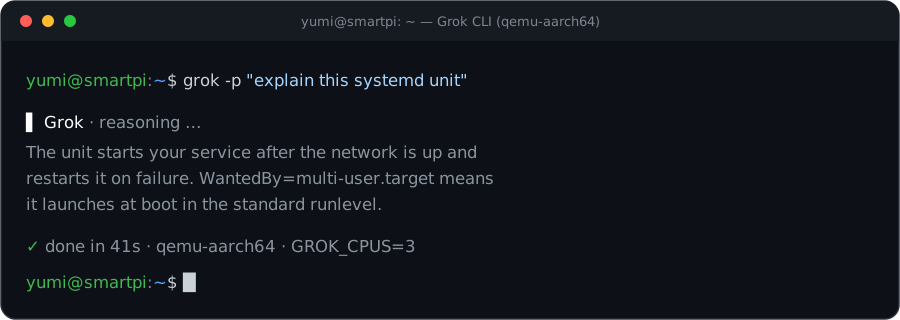 Live interface captured on a Yumi board (armv7l, Yumi OS 26.05).
6. Updating (OTA)
- Update: re-run
install.sh— that is the updater (exits fast when already newest;GROK_FORCE=1to reinstall,GROK_VERSION=<version>to pin). - Check:
grok-check-updateprints one JSON line ({installed, latest, update_available}). - Never run
grok update— it would install a binary outside the wrapper; re-runinstall.shinstead.
7. Notes
- First call is slower: a cold one-shot takes a while; the warm daemon makes repeat
grok -pcalls fast. - Thermals: sustained emulated loads run hot and can freeze the board — cap the cores with
GROK_CPUS(e.g.GROK_CPUS=0,1) to run cooler. Default is all 4 cores. earlyoomis enabled as a memory safety net on the 1 GB board. Rule of thumb: run one heavy CLI at a time.- Licensing: the installer scripts are MIT (YUMI-LAB); the vendored QEMU is GPL-2.0; the official Grok binary is downloaded from xAI at install time and is not redistributed here.