Official Linux Image
Official Armbian-based images for YUMI Smart Pi One and YUMI Smart Pad (Allwinner H3), built and published by YUMI-LAB.
We offer several Linux distributions optimized for our boards, in both Server (headless) and Desktop (GUI) editions. Choose the one that best fits your needs:
- Debian 13 Trixie — Current stable release (since August 2025). Latest packages, supported until 2028 + LTS until 2030. Recommended for new installations.
- Debian 12 Bookworm (the YUMI team's choice) — Previous stable release, supported until June 2028. Proven stability and security, ideal for production environments. Extensive package catalog and strong community support.
- Ubuntu 24.04 Noble — Current LTS release, supported until April 2029. User-friendly with abundant documentation, ideal for beginners.
- Ubuntu 22.04 Jammy — Previous LTS, standard support until April 2027. Use Noble (24.04) for new installations.
- Debian 11 Bullseye — End-of-life (EOL). Provided for legacy compatibility only, no longer recommended for new installations. Server only.
- Debian 14 Forky — Preview of the next Debian release, available as a release candidate only. For testing, not for a board you depend on.
Desktop editions come in more than one flavour: XFCE (the classic, full-featured desktop, on every distribution above), i3 (a lightweight tiling window manager, on Debian 13), and MATE (a traditional desktop, on Debian 14).
Debian or Ubuntu?
Debian is preferred for its proven stability and lightweight footprint. Ubuntu shines for its ease of use and quick access to new features. Both use apt as package manager.
Looking for something lighter? The DietPi image idles at about 87 MB of RAM against roughly 105 MB for a server image, and its download is a third of the size. All the choices are compared on the Operating Systems page.
Once you have downloaded the image of your choice, follow the flash guide to transfer it to a microSD card.
Skip the download entirely
Raspberry Pi Imager can pull these images straight from our list: it downloads, checks the SHA-256 and writes the card in one step, on Windows, macOS and Linux.
1. Requirements
microSD Card Compatibility
- Minimum: 4 GB — 8 GB or more for a desktop image
- Maximum: 32 GB — larger cards are not supported
- Use a genuine Class 10 / V30 card: a slow or counterfeit card is the most common cause of a board that will not boot. We sell one tested on these boards — YUMI 16 GB microSD.
- No card slot on your computer? Use a microSD-to-SD adapter, or a microSD-to-USB reader.
2. Download
The links below always point at the newest published release — they are regenerated from the GitHub releases every day.
v1.7.0 — latest stable release, 2026-04-23
Smart Pi One
| Distribution | Server | Desktop |
|---|---|---|
| Debian 13 Trixie |  |
 |
| Debian 12 Bookworm |  |
 |
| Ubuntu 24.04 Noble |  |
 |
| Ubuntu 22.04 Jammy |  |
 |
| Debian 11 Bullseye (EOL) |  |
— |
Smart Pad
| Distribution | Server | Desktop |
|---|---|---|
| Debian 13 Trixie | |
|
| Debian 12 Bookworm | |
|
| Ubuntu 24.04 Noble | |
|
| Ubuntu 22.04 Jammy | |
|
| Debian 11 Bullseye (EOL) | |
— |
Which version?
Trixie (13) is the current Debian stable — recommended for new installations. Bookworm (12) remains a solid choice for proven stability. Noble (24.04) is the current Ubuntu LTS, supported until 2029. Jammy (22.04) support ends April 2027, and Bullseye (11) is end-of-life — use them only to match an existing setup.
Every image has a matching .sha256 file on the release page. Verify before flashing:
3. Release candidate
v1.8.0-rc6 — release candidate, 2026-10-14
One image serves both the Smart Pi One and the Smart Pad — the touchscreen is detected at boot.
| Distribution | Server | Desktop |
|---|---|---|
| Debian 13 Trixie | |
  |
| Debian 14 Forky (preview) |  |
  |
| Debian 12 Bookworm | |
 |
| Ubuntu 24.04 Noble | |
 |
| Ubuntu 22.04 Jammy | |
— |
| Debian 11 Bullseye (EOL) | |
— |
What is new in v1.8.0-rc5
- Twelve images — Debian 14 Forky joins the matrix (server, XFCE desktop, MATE desktop), and Debian 13 Trixie gains a lightweight i3 desktop alongside XFCE. Treat Forky as a preview: the distribution keeps moving until Debian freezes it.
- The overclock is opt-in — every image now runs the stock frequency (up to 1296 MHz) by default. A switch enables a fixed 1368 MHz:
sudo smartpi-oc on/off/status. See Optional CPU overclock. - SSH over USB (OTG port) — one cable powers the board and carries the network. The board answers at
172.22.1.1; set172.22.1.2/24on the computer side. The gadget uses CDC NCM, supported natively by macOS, Linux and Windows. See SSH over USB. - Works on any screen up to 4K UHD — the display is fixed to 1280x720 at 60 Hz on the kernel command line, so every monitor from the SmartPad panel to a 4K screen accepts and upscales the picture. Remove
video=HDMI-A-1:1280x720@60from/boot/armbianEnv.txtto negotiate the native resolution instead. - WiFi ready — WiFi tools are preinstalled on every image; configure a USB adapter with
nmtui/armbian-configafter first boot. - Kernel packages published — the exact
linux-image,linux-headers,linux-dtbandlinux-u-boot.debfiles matching these images are attached to the release, for both kernel branches (current6.18 andlegacy6.12). Install DKMS headers from there, not fromapt.armbian.com, whose generic builds do not match this kernel. - One image for both boards — the 4.3" 800x480 touchscreen is detected at boot and the display rotated 180° only when it is found, so the
smartpi1images also serve the Smart Pad. On an HDMI monitor the orientation is untouched.
4. Lighter alternative — DietPi
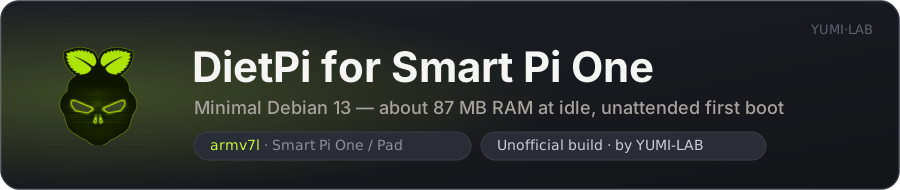
Built from the Debian server image (Trixie by default, Forky preview also available), the DietPi variant trades the desktop and part of the base system for memory: about 293 MB compressed and roughly 87 MB of RAM at idle, with a first boot that configures itself with no screen and no keyboard. Headless only, and currently a release candidate.
5. Comparison
| Debian 13 Trixie | Debian 12 Bookworm | Ubuntu 24.04 Noble | DietPi | |
|---|---|---|---|---|
| Status | Current stable | Previous stable | Current LTS | Release candidate |
| Best for | New installations | Proven stability | Ease of use | Low memory footprint |
| Support | Until 2028 (+ LTS 2030) | Until June 2028 | LTS until 2029 | Follows its Debian base |
| Desktop available | Yes | Yes | Yes | No |
| RAM at idle (measured) | 109 MB server · 378 MB desktop | 105 MB server | 104 MB server · 352 MB desktop | ~87 MB (vendor figure) |
| Package manager | apt | apt | apt | apt + dietpi-software |
Measured on hardware. Idle memory on a Smart Pi One (960 MB total), read minutes after boot with nothing added:
| Server image | RAM used | Available |
|---|---|---|
| Debian 14 Forky — release candidate | 107 MB | 852 MB |
| Debian 13 Trixie — Yumi 26.08.0 | 109 MB | 850 MB |
| Debian 12 Bookworm — Yumi 26.08.0 | 105 MB | 854 MB |
| Debian 11 Bullseye — Yumi 26.08.0 (legacy 6.12 kernel) | 86 MB | 850 MB |
| Ubuntu 24.04 Noble — Yumi 26.08.0 | 104 MB | 855 MB |
| Ubuntu 22.04 Jammy — Yumi 26.08.0 | 77 MB | 848 MB |
| DietPi — release candidate | ~87 MB (vendor figure) | — |
Each release is added here as it is measured, and any service you install comes on top. DietPi's figure is the vendor's own claim, not one of our own board measurements — see Default accounts for the root/pi logins (both yumi) once you flash it.
Desktop editions are a different story. Idle at the desktop, nothing open, same board:
| Desktop image | RAM used | Available |
|---|---|---|
| Debian 13 Trixie — XFCE | 378 MB | 581 MB |
| Ubuntu 24.04 Noble — XFCE | 352 MB | 607 MB |
| Debian 12 Bookworm — XFCE | 401 MB | 558 MB |
| Debian 14 Forky — XFCE (release candidate) | 345 MB | 614 MB |
| Debian 14 Forky — MATE (release candidate) | 413 MB | 547 MB |
| Debian 13 Trixie — i3 (release candidate) | 245 MB | 714 MB |
Xorg, the panel and its applets account for the gap with the server images — and for the 130 MB between XFCE and the tiling i3 session. Pick a server image whenever the board does not need a screen.
What that leaves for your own work. A web browser is the heaviest thing most people run here. Measured on the i3 image with a single YouTube tab open, the board reports around 320 MB still available with Chromium, and around 210 MB with Firefox ESR. One desktop plus one browser tab fits; two or three tabs do not. If the memory is meant for your own services, run a server image and connect over SSH — that keeps roughly 850 MB free.
6. Verify your board
Whichever image you flash, two commands confirm you are running the YUMI build:
cat /proc/device-tree/model
# YUMi SmartPi One

cat /sys/devices/system/cpu/cpu0/cpufreq/cpuinfo_max_freq
# 1296000  (1368000 once the optional overclock is enabled — see below)
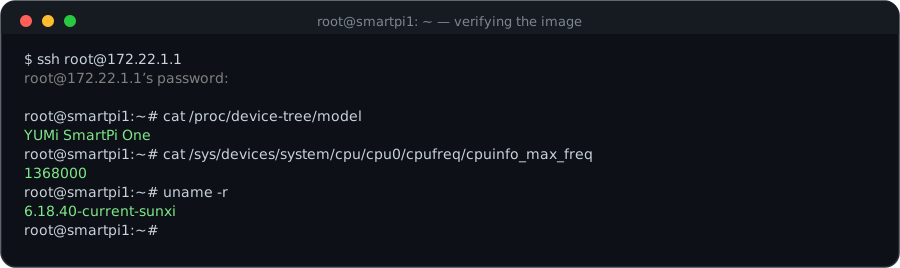
Every image ships with our custom U-Boot (DRAM 576 MHz, ZQ calibration, ODT), the YUMi SmartPi One device tree, and an optional 1368 MHz overclock you can switch on with one command. Kernel packages are held with apt-mark hold so an upgrade cannot replace them with generic Armbian builds — see what every YUMI image includes.