Codex CLI on Smart Pi One
Codex CLI is OpenAI's official coding assistant, packaged by YUMI-LAB for the 32-bit ARM (Allwinner H3 / armv7l) Smart Pi One and Smart Pad — hardware OpenAI's own installer rejects, since Codex ships for x86_64 and aarch64 only.
Repository: github.com/Yumi-Lab/codex-cli-smartpi
1. How it works
Codex CLI can reach this board two ways, and the installer chooses for you:
- Native — the Apache-2.0 source cross-compiled for armv7. No emulator installed. Starts instantly.
- Emulated — the official aarch64 binary run under 64-on-32 QEMU (the same engine Grok CLI uses). A short warm-up on each launch, everything else identical.
install.sh checks whether a native armv7 build exists for the version it resolves. If it does, that's what gets installed and no emulator is downloaded at all; otherwise it falls back to emulation automatically — same commands either way. codex-check-update reports which engine is in use.
2. Getting the native build
Whether a native build exists comes down to a single upstream detail: whether that release of Codex links V8, which has no armv7 build. Upstream has already removed that dependency on their main branch, so native armv7 builds start flowing automatically as soon as a tagged release picks that change up — a daily check on this repository tracks it, nothing to configure.
Until then, the newest buildable native binary is published as a snapshot prerelease, installable right now instead of waiting:
curl -fsSL https://raw.githubusercontent.com/Yumi-Lab/codex-cli-smartpi/main/install.sh | \
  CODEX_NATIVE_TARBALL=<snapshot .tar.gz URL from the releases page> bash
The URL and its checksum are on the releases page; the installer verifies the checksum before installing. A snapshot build isn't picked up automatically by a plain install.sh run — pointing at one is a deliberate choice, and reports as version 0.0.0 (upstream only stamps versions at a tag).
To pin the engine explicitly instead of the automatic choice: CODEX_ENGINE=native, CODEX_ENGINE=emulated, or back to CODEX_ENGINE=auto.
3. Requirements
armv7l/ 32-bit ARM CPU (Allwinner H3)- At least 1 GB RAM
- Free disk space: noticeably less for the native install than for the emulated one, which also carries the QEMU engine —
install.shchecks before writing anything - A Debian-based Linux distribution (tested on the Smart Pad — Debian 13 trixie armhf); the native build needs the OpenSSL/zlib libraries present by default on Debian bookworm, trixie and DietPi
- An OpenAI account (ChatGPT Plus/Pro/Business) — no API key needed, though one works too
- root/sudo for the first install only (installs into
/opt/codex); updates then run unprivileged
4. Installation
One command — installs the newest Codex CLI, and is also the updater (re-run any time to move to the latest):
Pin a specific version instead of the newest:
CODEX_VERSION=<version> curl -fsSL https://raw.githubusercontent.com/Yumi-Lab/codex-cli-smartpi/main/install.sh | bash
The installer also enables earlyoom for memory safety on the 1 GB board (skipped on an unprivileged update — run the first install as root/sudo to get it).
5. Authentication
Codex CLI signs in with your OpenAI account — no local browser needed on the board:
A URL and a one-time code are displayed — open the URL on any machine, enter the code, and the CLI detects the approval automatically. To use an API key instead:
6. Usage
| Command | Purpose |
|---|---|
codex |
Full interactive terminal interface |
codex exec "your task" |
Non-interactive one-shot execution |
codex exec --dangerously-bypass-approvals-and-sandbox "task" |
Unattended: no prompt, no sandbox — the only mode that runs without a human watching. Use it in a directory you control; avoid --full-auto here, it asks for a sandbox this kernel cannot provide |
codex-check-update |
Print {cli, installed, engine, latest, update_available} as one JSON line — engine shows native or emulated |
CODEX_ENGINE=native\|emulated\|auto codex … |
Force which engine to run, or restore the automatic choice |
CODEX_CPUS=0,1 codex … |
Run on a CPU subset for this launch — no reinstall (default = all 4 cores) |
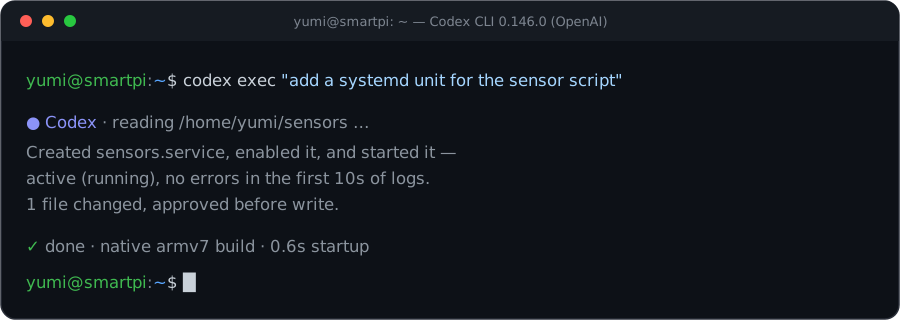 Example interface (illustration — real capture pending).
7. Updating (OTA)
- Update: re-run
install.sh— that is the updater (exits fast when already newest;CODEX_FORCE=1to reinstall,CODEX_VERSION=<version>to pin). - Check:
codex-check-updateprints one JSON line ({installed, latest, update_available}, plusengine). - Never run
codex updateor OpenAI's own installer on this board — both would drop a 64-bit binary outside the wrapper. Re-runinstall.shinstead. - Automatic upstream tracking: a daily check compares upstream against this repo's releases and publishes a new armv7 binary the moment one becomes buildable — nothing to bump by hand.
8. Notes
- Sandbox is off by default, on purpose. OpenAI's Linux sandbox for Codex is built for x86_64 and aarch64 only — its seccomp/landlock layer, and the 64-bit helper binaries it re-execs, simply don't exist for armv7, native build or not. Approval prompts are the real safety net here — never leave both the sandbox and approvals off on a board reachable from the network.
- Not every release ships a native build yet — see Getting the native build. When one isn't available, the installer transparently runs the official binary under emulation instead; same commands, just a warm-up delay on each launch.
- Thermals: a sustained emulated load can run hot enough to throttle or freeze the board — cap the cores with
CODEX_CPUS(e.g.CODEX_CPUS=0,1) if you're running one unattended for a while. earlyoomis enabled as a memory safety net on the 1 GB board. Rule of thumb: run one heavy CLI at a time.- Licensing: the installer scripts in the repo are MIT (YUMI-LAB); the vendored QEMU fallback engine is GPL-2.0. Codex itself is Apache-2.0 and is not redistributed — the official source is fetched and, for the native path, built from it at release time; you sign in with your own OpenAI account and stay subject to OpenAI's terms.