Claude Code CLI on Smart Pi One
Claude Code CLI is Anthropic's official AI coding assistant, adapted by YUMI-LAB to run natively on the 32-bit ARM (armv7l) Smart Pi One and Smart Pad — hardware the standard installer rejects as "64-bit only".
Repository: github.com/Yumi-Lab/claude-code-smartpi
1. How it works
Claude Code runs natively on the board, always on the latest version. One command installs it — and the same command updates it. You sign in with your Claude Pro/Max account; no API key needed.
2. Requirements
armv7l/ 32-bit ARM CPU (Allwinner H3)- At least 1 GB RAM
- A Debian-based Linux distribution (tested on the Smart Pad — Debian 13 trixie armhf)
- A Claude Pro or Max account (no API key needed)
- root/sudo for the first install only (it installs into
/opt/claude-code); updates then run unprivileged
3. Installation
One command — installs the newest Claude Code, and is also the updater (re-run any time to move to the latest):
Pin a specific version instead of the newest:
curl -fsSL https://raw.githubusercontent.com/Yumi-Lab/claude-code-smartpi/main/install.sh | bash -s -- <version>
The installer also enables earlyoom for memory safety on the 1 GB board.
4. Authentication
Claude Code signs in with your Claude Pro/Max account — no API key required, and no local browser needed on the board:
An OAuth URL is displayed — open it on any machine, approve, and paste the one-time code. The CLI then prints a sk-ant-oat… token (valid one year) once, without saving it — copy it immediately and persist it:
5. Usage
The everyday command is just claude — interactive or headless:
| Command | Purpose |
|---|---|
claude |
Full interactive interface — the real official TUI |
claude -p "your question" |
One-shot answer (full agent mode: reads/writes files, runs commands) |
claude setup-token |
Sign in with a Claude Pro/Max account (one-time OAuth code) |
claude-token-save <token> |
Persist the 1-year token |
claude-check-update |
Print {"installed":…,"latest":…,"update_available":…} as one JSON line |
claude-daemon-status |
Batch mode: how many agents are running / queued (--json for scripts) |
CLAUDE_CPUS=0,1 claude … |
Run on a CPU subset for this launch — no reinstall (default = all 4 cores) |
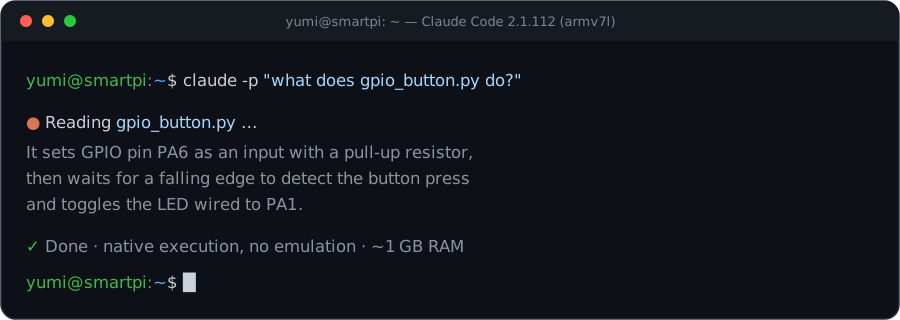 Live interface captured on a Yumi board (armv7l, Yumi OS 26.05).
Running many agents (batch mode)
Each agent holds a full runtime (a few hundred MB), so a 1 GB board only runs a few at once. To submit any number of headless jobs safely, enable the built-in job daemon — it runs a bounded number at a time and queues the rest:
export CLAUDE_DAEMON=1              # route headless jobs through the daemon
export CLAUDE_MAX_CONCURRENT=3      # how many run at once (default 3)
claude -p "task 1" &  claude -p "task 2" &  …  claude -p "task 20" &
Measured on the pad: 20 jobs → 3 at a time until the queue drains → 20/20 succeed, memory kept safe throughout. The daemon starts on the first job and stops when idle; watch it with claude-daemon-status. Interactive claude always runs directly (leave CLAUDE_DAEMON unset for plain behaviour).
6. Updating (OTA)
- Update: re-run
install.sh— that is the updater (exits fast when already newest;CLAUDE_FORCE=1to rebuild). - Check:
claude-check-updateprints one JSON line ({installed, latest, update_available}). - Do not run
claude update— auto-update is disabled on this platform (it would fetch a 64-bit binary).
7. Notes
- Performance: the first install takes a few minutes and a larger download; every launch afterwards is fast, and multi-turn agentic sessions are stable. Each running agent holds a full runtime (a few hundred MB), which is why the batch daemon above exists on a 1 GB board.
- CPU control: prefix any command with
CLAUDE_CPUSto pin Claude to specific cores (the same knob asGROK_CPUS/KIMI_CPUS), e.g.CLAUDE_CPUS=0,1 claude. Default is all 4 cores. earlyoomis enabled as a memory safety net on the 1 GB board. Run one heavy CLI at a time, or use the batch daemon above for many agents.- Licensing: the scripts, shim and launcher in the repo are MIT (YUMI-LAB). Claude Code itself is not redistributed — it is obtained from Anthropic's official channels, stays on your own device, and remains subject to Anthropic's terms.