Vibe CLI on Smart Pi One
Vibe CLI is Mistral AI's official Vibe command-line assistant, packaged by YUMI-LAB to run on the 32-bit ARM (Allwinner H3 / armv7l) Smart Pi One and Smart Pad — hardware most modern AI CLIs cannot run on without emulation.
Repository: github.com/Yumi-Lab/vibe-cli-smartpi
1. How it works
Vibe CLI runs natively on the board, always on the latest version. It's a thin client — the AI work happens on Mistral's servers, so the board stays light. One command installs it, and the same command updates it. You sign in with your Mistral account, or use an API key.
2. Requirements
armv7l/ 32-bit ARM CPU (Allwinner H3 or compatible Cortex-A7)- At least 1 GB RAM (swap protection via
earlyoom) - A Debian-based Linux distribution with build essentials (tested on the Smart Pad — trixie armhf)
- A Mistral account (browser sign-in) or a Mistral API key — both managed at console.mistral.ai
3. Installation
Run the one-line installer on your Smart Pi One as a normal user (not root):
The first install compiles a few native dependencies from source and takes a few minutes on the board (the compile is core-limited to keep temperatures in check — see Limiting CPU cores). Re-run the installer any time to update. It adds ~/.local/bin to your PATH via ~/.bashrc and ~/.profile — open a new shell afterwards.
4. Authentication
Vibe CLI supports two ways to authenticate — sign in with your Mistral account, or use an API key. Both are tied to console.mistral.ai.
Sign in with a Mistral account (recommended)
Run the setup wizard and choose "Sign in with browser":
It mints a one-time console.mistral.ai/codestral/cli/authenticate?… URL tied to your Mistral account — approve it in any browser already logged in to Mistral. On a headless board, use the helper, which prints the URL so you can approve it from another machine:
Use a Mistral API key
Create a key at console.mistral.ai → API keys, then provide it in one of three ways:
# 1. Interactive setup wizard
vibe --setup

# 2. Headless — write it to the env file
mkdir -p ~/.vibe && echo 'MISTRAL_API_KEY=sk-...' >> ~/.vibe/.env

# 3. Per-shell export
export MISTRAL_API_KEY=sk-...
5. Usage
| Command | Purpose |
|---|---|
vibe |
Full interactive TUI with prompts and session management |
vibe -p "your question" |
One-shot answer in programmatic mode |
vibe -p "your task" --yolo |
One-shot with auto-approval for all tool calls |
vibe --output streaming -p "…" |
Streaming, newline-delimited JSON output |
vibe -c / vibe --resume |
Continue or resume the previous session |
vibe --setup |
Sign-in wizard (browser account or API key) |
vibe-signin |
Headless browser sign-in helper (prints the approval URL) |
vibe-check-update |
OTA probe — one JSON line |
VIBE_CPUS=0,1 vibe … |
Pin the running agent to a CPU subset (default = all 4 cores) |
In agent mode, Vibe CLI can read and edit files and run commands on the board — useful for scripting the GPIO sensors, configuring services, or working through Smart Pi projects.
Limiting CPU cores
Two variables control core usage: VIBE_BUILD_CPUS bounds the one-time wheel compilation, and VIBE_CPUS bounds the running agent (the counterpart of GROK_CPUS / KIMI_CPUS).
# Cap the install compile (cooler on a passively-cooled board, or frees cores)
VIBE_BUILD_CPUS=0,1 curl -fsSL https://raw.githubusercontent.com/Yumi-Lab/vibe-cli-smartpi/main/install.sh | bash

# Pin the running agent to a core subset
VIBE_CPUS=0,1 vibe -p "explain this error"
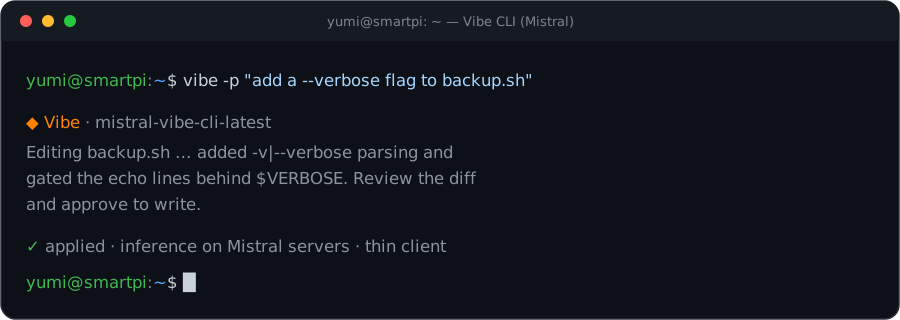 Live interface captured on a Yumi board (armv7l, Yumi OS 26.05).
6. Notes
- Thin client: your code and prompts are sent to Mistral's servers for inference. No large model runs on the board.
- Performance: the one-time install compiles from source and takes a few minutes (it's the hot part — cap it with
VIBE_BUILD_CPUSto run cooler). Afterwards each launch pays a short Python cold start; inference time is set by Mistral's servers. - Updating: re-run
install.sh— that is the updater (it upgrades in place). Do not run a bareuv tool upgrade/vibe --check-upgradeinstall path — it drops the YUMI-LABVIBE_CPUSwrapper; the installer restores it.vibe-check-updateprints{installed, latest, update_available}. earlyoomis installed as a memory safety net on the 1 GB board. Rule of thumb: run one heavy CLI at a time.- Licensing: the installer scripts are MIT (YUMI-LAB); Mistral Vibe itself remains subject to Mistral AI's terms and is installed from the official distribution at runtime.